Why rebuild
The previous 2tec.be was a Hostinger-hosted PHP affair I hadn’t touched in three years. The bill was small, but the site read like an ad for a service I no longer sell. I wanted three things from the rebuild:
- Fast. Static where possible, no JS framework runtime on the page.
- Cheap. Realistically free for a portfolio’s traffic.
- Boring infra. I want to push to
mainand stop thinking about it.
Astro on Cloudflare Workers Static Assets hit all three.
Stack choice
The interesting decision was Workers vs Pages. Pages is the more obvious answer for a static site, but Cloudflare has been quietly de-emphasizing it in favor of Workers Static Assets — the same Workers runtime, with a folder of static files mounted as an ASSETS binding. You get Pages-level static serving plus a real Worker for any dynamic bits (API routes, redirects, headers). One product, one mental model.
The whole wrangler.toml is twelve lines:
name = "2tec"
main = "worker.js"
compatibility_date = "2025-01-01"
compatibility_flags = ["nodejs_compat"]

[assets]
directory = "./dist"
binding = "ASSETS"
not_found_handling = "404-page"

[[send_email]]
name = "EMAIL"
destination_address = "jelle.sturm@gmail.com"

[observability]
enabled = true
Astro generates dist/ on build. The ASSETS binding handles every static request. The Worker entry point is dead simple — fall through to assets unless the request hits an API path:
export default {
  async fetch(request, env) {
    const url = new URL(request.url);
    if (url.pathname === "/api/contact") {
      return await handleContact(request, env);
    }
    return env.ASSETS.fetch(request);
  },
};
That’s the whole runtime story. No edge function platform-specific quirks, no provider lock-in beyond “this is a Worker.”
Content as files
Astro’s content collections turn a folder of markdown into a typed, queryable corpus. Define the schema once:
// src/content.config.ts
import { defineCollection, z } from 'astro:content';
import { glob } from 'astro/loaders';

const blog = defineCollection({
  loader: glob({ pattern: '**/*.md', base: './src/content/blog' }),
  schema: z.object({
    title: z.string(),
    date: z.coerce.date(),
    tag: z.enum(['AI', 'DevOps', 'Case study', 'Home Assistant']),
    excerpt: z.string(),
    readingTime: z.string(),
    toc: z.array(z.string()),
    draft: z.boolean().default(false),
  }),
});

export const collections = { blog };
The post you’re reading right now is a markdown file with frontmatter. The blog index reads it via getCollection('blog'), the post route at src/pages/blog/[slug].astro renders it through a layout. Adding a new post is git add src/content/blog/new-post.md && git push. There is no CMS. There is no database. Files in git are the source of truth.
This is also why every project case-study is its own markdown file under src/content/projects/. Same pattern, different schema.
Deploying via Workers Builds
Cloudflare Workers Builds is their own GitHub-connected CI/CD, equivalent to Pages’ build system but for Workers. Connect a repo, set a build command, deploy command, and Cloudflare runs wrangler deploy inside its own container on every push. No GitHub Action, no CLOUDFLARE_API_TOKEN secret to rotate, no third-party CI minutes.
For this site:
| Field | Value |
|---|---|
| Build command | npm run build |
| Deploy command | npx wrangler deploy |
| Root directory | / |
That’s the entire CI configuration. Cloudflare’s build container already has my account context, so Wrangler authenticates implicitly. Push to main, build runs, deploy fires, the new version is live in about ninety seconds. The build logs are in the same dashboard as the runtime metrics, which beats clicking through GitHub Actions tabs to find a failed deploy.
The tradeoff: if I needed preview environments per PR, gating on tests, or a monorepo path filter, GitHub Actions would still be the right call. For a portfolio with one branch and zero tests, Workers Builds is the simpler answer.
Custom domains
Attaching a domain to a Worker is one API call:
await cloudflare.request({
  method: "PUT",
  path: `/accounts/${accountId}/workers/domains`,
  body: {
    environment: "production",
    hostname: "2tec.be",
    service: "2tec",
    zone_id: zoneId,
  },
});
Cloudflare auto-provisions the cert, manages the DNS records, and routes the hostname to the Worker. No A records to add, no CNAME to point at a *.workers.dev URL. If the apex already has DNS records pointing somewhere else (Hostinger in my case), the API errors out until you delete or override them — a useful safety check, not a footgun.
I attached 2tec.be, www.2tec.be, jellesturm.dev, and www.jellesturm.dev to the same Worker in a single batch. All four resolve to the same site.
The free email path
This was the most interesting subproblem. The contact form needed to send email, and the obvious answer was Cloudflare Email Sending — a clean Workers binding, official, supported. It’s also part of the Workers Paid plan ($5/mo). For a contact form that gets maybe ten submissions a month, $60/year is a tax I didn’t want to pay.
The free path is older and stranger: the legacy cloudflare:email API, which sends through Email Routing (the inbound forwarding product) to any verified destination address. It’s free and unlimited as long as you only send to addresses you’ve verified.
For a form that always emails me, that’s perfect. The binding declares the destination up front:
[[send_email]]
name = "EMAIL"
destination_address = "jelle.sturm@gmail.com"
Sending uses the legacy EmailMessage API with mimetext for MIME assembly:
import { EmailMessage } from "cloudflare:email";
import { createMimeMessage } from "mimetext";

const msg = createMimeMessage();
msg.setSender({ name: "2tec.be contact form", addr: "forms@2tec.be" });
msg.setRecipient("jelle.sturm@gmail.com");
msg.setSubject(`[2tec hire] ${name} <${email}>`);
msg.addMessage({ contentType: "text/plain", data: text });

await env.EMAIL.send(
  new EmailMessage("forms@2tec.be", "jelle.sturm@gmail.com", msg.asRaw())
);
There’s one prerequisite that bit me: Email Routing has to be enabled on the sender’s domain. If the apex is using a different mail provider — Hostinger, Google Workspace, whatever — turning on Email Routing replaces the MX records. I had to migrate jelle@2tec.be off Hostinger to Cloudflare Email Routing (forwarding to Gmail) before the Worker binding would accept forms@2tec.be as a sender.
For spam, Turnstile is the path of least resistance. Drop the widget into the form, verify the token in the Worker, done:
const r = await fetch("https://challenges.cloudflare.com/turnstile/v0/siteverify", {
  method: "POST",
  body: (() => {
    const b = new FormData();
    b.append("secret", env.TURNSTILE_SECRET);
    b.append("response", token);
    b.append("remoteip", request.headers.get("CF-Connecting-IP"));
    return b;
  })(),
});
const { success } = await r.json();
if (!success) return Response.json({ error: "captcha_failed" }, { status: 400 });
One quirk: Turnstile widgets are locked to specific hostnames. After attaching jellesturm.dev to the Worker, I had to add it to the widget’s allowlist or visitors from that domain saw “Unable to connect to website” instead of a captcha.
The 2TEC banner saga
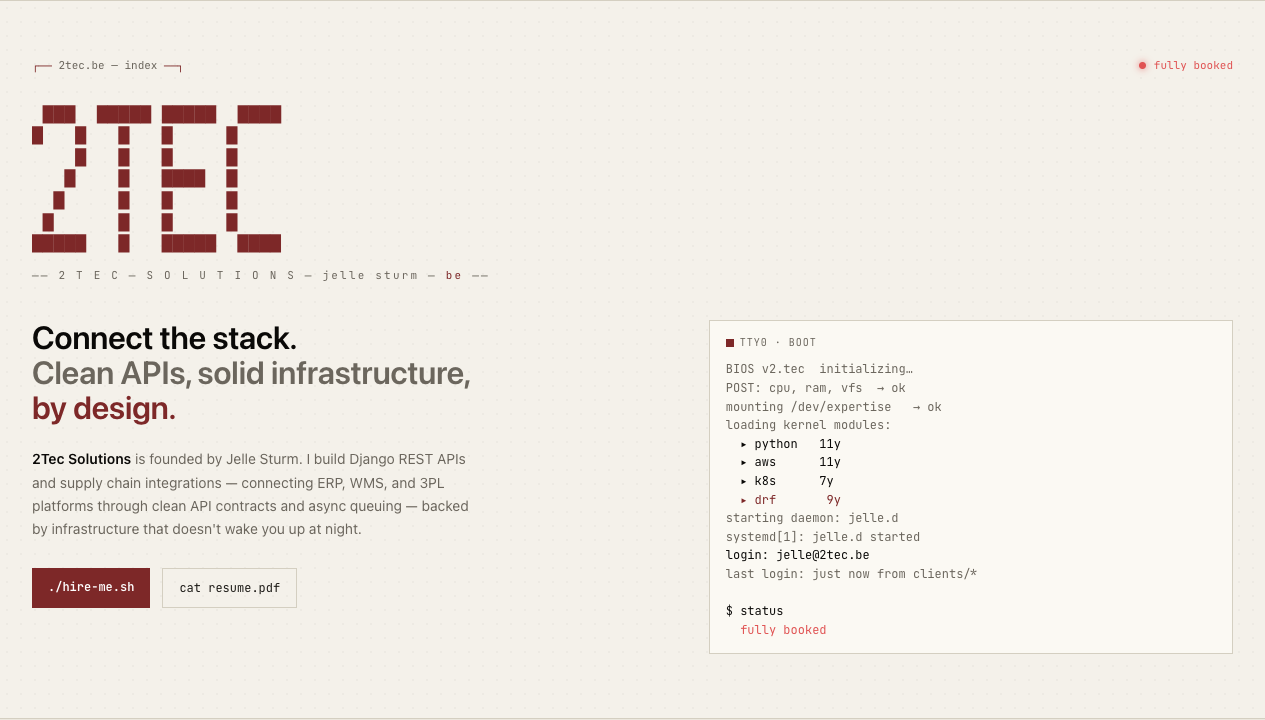
The hero on this site renders “2TEC” as a 7×23 grid of █ (FULL BLOCK) characters in a <pre> element, with a JavaScript scramble animation on top. On Chrome and Safari it rendered exactly as intended:
On Firefox mobile it rendered like exploded confetti. Each █ glyph in the system monospace font was rendered narrower than its em-square, leaving a visible gap between consecutive blocks. The shape of “2TEC” was barely recognizable.
I tried the obvious fixes:
- Loosening
line-heightfrom 1.05 to 1.2 — fixed vertical overlap, didn’t fix the horizontal gaps. - Removing
letter-spacing— Firefox applies letter-spacing inconsistently across box-drawing chars vs. ASCII, but removing it didn’t fix the gap problem either. - Loading JetBrains Mono via Google Fonts — JetBrains Mono is built for exactly this kind of work and renders block characters at full cell width. It helped on most browsers, but the box-drawing gaps came back on certain Firefox builds anyway.
The real fix was to stop relying on font glyphs entirely. The same cells array I use to feed the scramble animation can be rendered as a CSS Grid of <span>s, with each filled cell painted via background: var(--accent):
<div class="hero__art--grid" aria-label="2TEC" role="img">
  {cells.map((cell) => (
    <span class:list={['banner-cell', { 'banner-cell--on': cell.filled }]}></span>
  ))}
</div>
.hero__art--grid {
display: none;
grid-template-columns: repeat(23, 1fr);
width: min(280px, 70%);
aspect-ratio: 23 / 7;
}
.banner-cell--on { background: var(--accent); }
@media (max-width: 720px) {
.hero__art--anim { display: none; }
.hero__art--grid { display: grid; }
}No fonts, no Unicode, no glyph rendering. Just 161 colored boxes in a grid. Pixel-perfect everywhere:
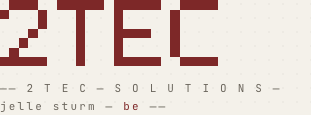
Desktop keeps the animated <pre> — the scramble effect is fun and Chrome/Safari render it fine. Below 720px the static grid takes over.
The lesson, restated for myself: anything you draw with █ and pals will render at the mercy of whatever font the user’s browser falls back to. If you need a known shape, draw it with shapes — DOM, SVG, canvas — not with glyphs.
What I’d change
A handful of things I’d tighten if I were doing this again:
- Skip the legacy email path entirely if you’re already paying for the Workers Paid plan. The new Email Sending API is cleaner, has better deliverability tooling, and doesn’t require Email Routing on the sender domain. For a free build, the legacy path is the right answer; for $5/month, it isn’t.
- Don’t use box-drawing characters in any banner you care about. Two days of debugging that I won’t get back. SVG or CSS Grid from day one.
- Wire the Cloudflare GitHub App carefully. Workers Builds asks for repo access during the OAuth flow. I gave it access to a single repo, which is the correct call — but the dashboard doesn’t surface that scope clearly afterwards, and the only way I found to verify it was via GitHub’s own settings page.
- Cache headers are per-asset, not per-domain. Workers Static Assets has sensible defaults, but if you want fingerprinted JS/CSS to live in browser caches for a year, you’ll be writing a small handler in
worker.js. I haven’t bothered yet, and at this site’s scale it doesn’t matter.
The whole site is six Astro pages, ~30 components, two markdown collections, and one tiny Worker. It deploys on every push to main, costs nothing, and the only time I’ve thought about infrastructure since the initial setup was when a font glyph rendered weirdly on Firefox. That’s the bar I had in mind when I started.